Comprehensive Screenshot Annotation Tool
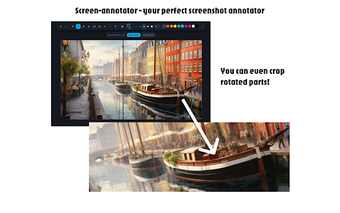
Screen Annotator is a versatile Chrome extension designed for capturing and annotating screenshots. It offers a range of professional-grade features, making it an ideal tool for creating tutorials, bug reports, and design mockups. Users can easily capture screenshots by pressing Ctrl+Shift+S, and then utilize a variety of annotation tools such as freehand drawing, shapes, and text to enhance their images. The extension also allows for precise image cropping and professional editing capabilities, including layer management and transformation controls.
Top Recommended Alternative

In addition to its rich annotation tools, Screen Annotator provides customizable styling options, enabling users to select colors, adjust opacity, and add drop shadows. The extension supports efficient keyboard shortcuts for fast tool selection and editing, streamlining the workflow significantly. Users can export their annotated images in high-resolution PNG format or copy them to the clipboard for instant sharing. With its intuitive interface and offline functionality, Screen Annotator is a valuable asset for developers, designers, and content creators.